
AI Decision Models: What They Are, Available Models, and Best Enterprise Use Cases
Market information checked October 7, 2026.
Imagine an operations team receiving hundreds of supplier emails. Some contain new proposals, others announce delivery delays, and a few require immediate attention. Before anyone writes a response, someone must decide where each message belongs.
That is the kind of task worth considering for an AI decision model: not producing another paragraph, but returning a judgment that software can use.
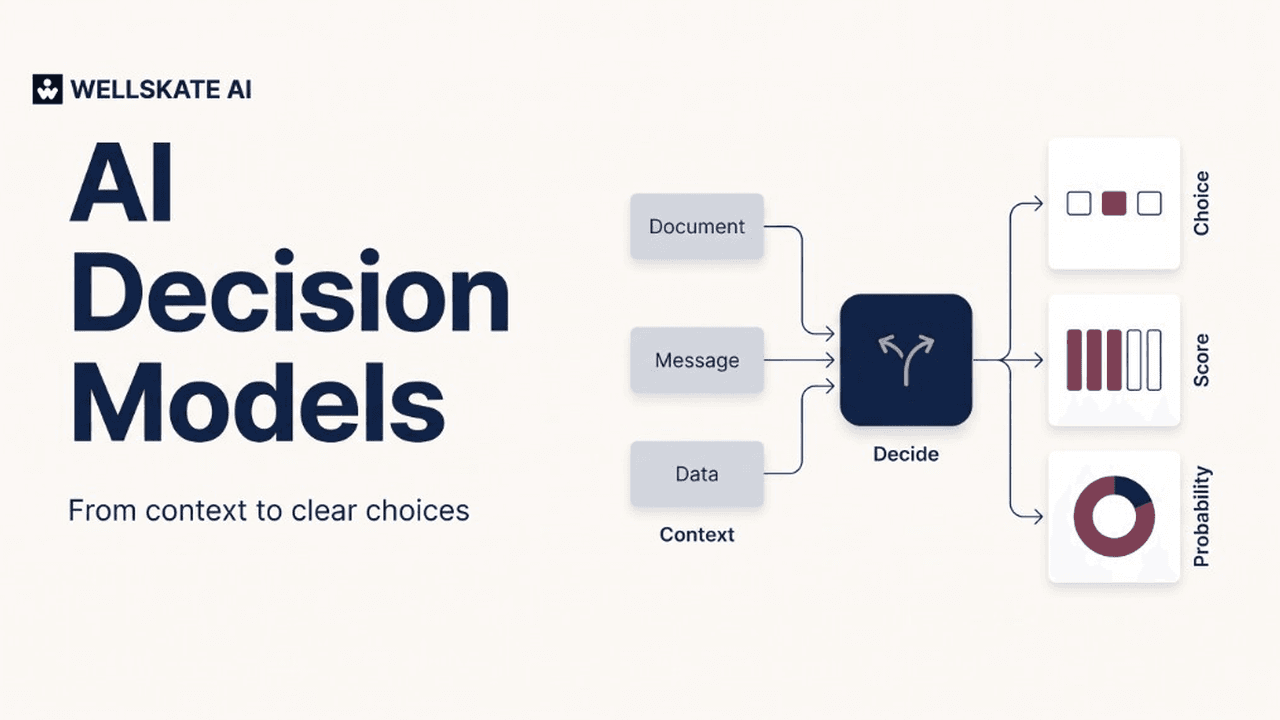
Decision models evaluate supplied information against defined questions and return bounded answers — such as a category, a score, or a probability. Their output can help an application route work, prioritize a queue, or request human review. They are designed for a different role from open-ended text generation.
The useful question for businesses is therefore not “Which model is smartest?” It is: Which decisions should we automate, with what evidence, and under whose authority?
What is an AI decision model?
In this article, decision model means an AI model designed to answer constrained questions about supplied context. It does not mean a traditional management framework or a complete decision-management platform.
A typical request contains three elements:
- Context: The message, document, image, or application state to evaluate.
- Question: The specific judgment required.
- Allowed answers or rubric: The categories, conditions, or scoring levels the application will accept.
Depending on the implementation, the response contains a selected answer, probabilities over possible answers, and sometimes a separate confidence value. Input support and output semantics vary by provider.
For our hypothetical supplier inbox, that could mean:
- Choice: Which queue should handle this message — procurement, logistics, accounts payable, or manual review?
- Score: How urgent is it, on a rubric from a routine update to a production-stopping delay?
- Yes/no probability: Does the message ask to change bank details?
These are illustrative questions, not results from a model test.
Several APIs call these question types choice, score, and noul. A noul answer is the probability that a yes/no condition is true, from 0 to 1. OpenAI’s Decisions API uses predicate for that yes/no job, and choice and score for the other two. The naming is less important than understanding what each returned number represents.
How are decision models different from LLMs and classifiers?
They focus on choosing, rather than composing
Native decision models can score permitted answers without generating a prose response token by token. However, this is not one universal architecture: Laya uses an encoder-based approach, while Cloudflare’s Clef adapts a language-model backbone for non-autoregressive decision scoring. “Decision model” describes a role and interface, not a single model design.
That specialization can offer speed advantages in repeated classification workflows. It does not establish that every decision model is faster, cheaper, or more accurate than every alternative under your workload. Cloudflare’s own comparisons show task-dependent quality and latency differences.
Structured output is not the same as decision specialization
Generative LLMs can already return schema-constrained outputs. You do not necessarily need to extract a category from a paragraph. The distinction is the model’s prediction behavior, probability information, and suitability for the task — not simply whether its response is valid JSON. Schema compliance also does not guarantee factual correctness.
Classification itself is not new
Traditional classifiers, zero-shot classifiers, and decision models overlap. Some zero-shot classifiers also accept caller-defined labels. The newer decision-model offerings package multiple typed judgments and probability outputs into interfaces intended for application workflows; they have not invented classification.
A practical selection guide is:
- Use rules when trusted fields and explicit conditions already determine the answer.
- Evaluate a classifier for a well-defined labeling task.
- Evaluate a decision model for repeated, bounded judgments over unstructured information.
- Use a generative or reasoning model when the task needs a plan, explanation, extraction, or original content.
These approaches can coexist in the same application.
Which decision models are available now?
The following is a selective snapshot of commercial decision models with a documented API, checked on October 7, 2026. “Available” means a provider has published an endpoint or model card. It is not a certification that the offering meets your security, residency, or production requirements, and it is not a ranking.
Do not choose from headline benchmarks alone. Published evaluations can use different datasets, hardware, serving configurations, and definitions of latency. Perplexity’s quickstart, for example, reports end-to-end API time from tests on September 30, 2026. Other vendors publish model time, or a median from their own harness. Those clocks do not measure the same thing. A vendor comparison can also put one model ahead on one task and behind on the next. Cloudflare’s October 1 table is an example: Clef leads several intent and tool-selection sets, while other models lead on individual tasks.
Most of these APIs share a shape. You send context, then one or more typed questions. choice picks one label you defined and returns a probability per option. score places the input on an ordered rubric; the number can fall between levels because it is a probability-weighted average. noul — predicate in OpenAI’s API — returns the probability that a condition is true. On choice and score, several providers also return a separate confidence value. Perplexity’s quickstart is explicit that this is not the same number as the winning option’s probability. Read each provider’s definition before you threshold on it.
List prices below are each provider’s published input rate per million tokens. On these decision endpoints, the providers state that output tokens are not charged. Gateways, regional processing, and long-context multipliers can change the bill. Confirm the current rate before you budget.
| Offering | Question types | Documented inputs | List input price |
|---|---|---|---|
| TypeSafe Jev 1.13 | choice, score, noul | Text | $0.042 |
OpenAI Decisions (gpt-6-luna, public beta) | predicate, choice, score | Text and images | $0.10 |
| Perplexity Decider v1 and v1.1 (27B) | noul, choice, score | Text, JSON, and embedded images | $0.02 |
| Cloudflare Clef / Clef-flash | noul, choice, score | Text, JSON, images, and video | $0.24 / $0.09 |
| Liquid AI d1 | noul, choice, score | Text and images on the native API | $0.04 |
TypeSafe Jev
Jev is TypeSafe’s System One model, and the interface many later decision APIs follow. The current documented release is Jev 1.13 (jev-1.13.0), also reachable as the alias jev-latest. It is served at POST /v1/systemone.
Jev accepts text: a string, a JSON object, or an array of text values. The model page does not accept images, audio, or video. TypeSafe documents a 64,000-token budget for the state plus all questions, and a 32,000-token budget for the state plus the single longest question. List price is $0.042 per million input tokens. English is the primary training language; TypeSafe says other languages, including CJK scripts, should be tested on your own content. The same request shape is also available through OpenRouter.
OpenAI Decisions API
OpenAI’s Decisions API is in public beta, with general availability described as coming in the following weeks. The only model on the endpoint today is gpt-6-luna, called with POST /v1/decisions.
The three question types are predicate, choice, and score. Input can be text, or user messages that include images. OpenAI’s guide uses a product photo as the predicate example: the probability that visible damage is present. The same guide says the API returns typed answers about 10 times faster than the Responses API. That figure is OpenAI’s comparison with its own generative endpoint, not a cross-vendor ranking.
Documented pricing for this endpoint is $0.10 per million input tokens, with no cache-read, cache-write, or output-token charge. Regional premiums and long-context input multipliers can still apply. OpenAI also states that the Decisions API supports Zero Data Retention and HIPAA for eligible customers, with data residency in the United States and in Europe (EEA and Switzerland). Eligibility depends on the current data-controls terms.
Perplexity Decider
Perplexity’s Decisions API answers at POST https://api.perplexity.ai/v1/decisions. The documented models are pplx-decider-v1.1-27b and pplx-decider-v1-27b. State can be text, JSON, or images. Images must be embedded PNG, JPEG, or WebP data URLs; the API does not fetch a remote image URL.
Question types are noul, choice, and score. One request can carry up to 128 questions, within an input limit under 262,144 tokens. The current list price is $0.02 per million input tokens, and output tokens are free. Perplexity’s cookbook shows a practical split: a decision model triages support tickets, and only the escalated tickets go on to a generative agent.
Cloudflare Clef and Clef-flash
Cloudflare released Clef and Clef-flash on Workers AI on October 1, 2026, as @cf/cloudflare/clef (27B) and @cf/cloudflare/clef-flash (9B). The weights are published under the Apache 2.0 license. Both follow the System One question types, so a Jev-style request can be pointed at Clef by changing the endpoint and model.
Clef uses a language-model backbone and scores the allowed answers without generating a reply token by token. The Workers AI model page lists a 65,536-token context window and accepts text, JSON, images, and video. Hosted image input is embedded, up to four images; remote image URLs are not accepted. List price is $0.24 per million input tokens for Clef and $0.09 for Clef-flash. Cloudflare also describes a hands-on fine-tuning service for Clef, with a self-serve trainer planned after that.
Cloudflare’s launch post uses Clef for support triage, domain classification, trust-and-safety rubrics, agent guardrails, and visual classification. Those are documented applications. The benchmark table in the same post is mixed by task, so it is a reason to test Clef on your data, not a reason to skip the test.
Liquid AI d1
Liquid AI announced vision for d1 on October 5, 2026. On the native API the model id is d1, at POST https://api.liquid.ai/decisions/v1/systemone. It accepts text, images, or both, and answers noul, choice, and score questions. Liquid states that a text decision takes about 200 to 300 milliseconds, and that d1 is billed at $0.04 per million input tokens, with images counted as input tokens and no output-token charge.
On Vercel and OpenRouter, Liquid says d1 is available for text, with vision still planned on those gateways. The announcement’s examples include filtering support tickets, filing passages into folders, choosing a web agent’s next permitted action, compacting tool output, and screening production-line photos. The accuracy and cost comparisons in that post are Liquid’s own evaluation against generative models. Treat them as a vendor result, then measure d1 on the documents you actually use.
Open weights, when you need to run the model
Clef’s weights are one path for a local experiment. Laya, from Convai Innovations, is another open-weight decision model: a bidirectional encoder that scores the options you supply and returns choice, score, and noul probabilities. The English checkpoint’s default budget is 512 tokens per question, which is a different fit from the long-context hosted APIs above. Laya’s own notes say the shipped probabilities can be over-confident until calibration is fit on held-out data for your option counts.
Other hosted and experimental models use related request shapes. This list is the set with first-party documentation we could verify on October 7, 2026. It will move.
What is worth comparing, once the names are on the table:
- Whether your evidence is text, or also photos and screenshots
- How much context a real case needs
- Hosted API, open weights, or a fine-tune
- Data-handling terms, residency, and beta status
- Price on your token mix, including images and retries
- Quality on a labeled set from the workflow, including whether the probabilities are calibrated
Best enterprise use cases for decision models
Our recommended starting point is a frequent, narrow judgment with measurable errors and a reversible downstream action. The following are illustrative workflow designs, not claims of guaranteed performance.
1. Routing and prioritizing incoming work
Pilot idea: Classify supplier messages into procurement, logistics, accounts payable, or manual review. Separately score urgency using an explicit rubric.
Keep category and urgency distinct: a routine delivery update and a production-stopping delay may belong to the same team but require different attention.
Support triage and agent routing are documented applications of decision models. For your pilot, measure misrouting, missed urgent cases, and reviewer overrides — not just average accuracy.
2. Document and knowledge filtering
Pilot idea: Before generating a supplier briefing, assess whether each retrieved passage concerns delivery performance, commercial terms, or an unrelated topic.
Liquid’s d1 announcement describes filtering tickets and filing passages into folders. Treat that pattern as a candidate relevance layer, not an automatic replacement for every retrieval component.
Our suggested safeguard: sample excluded passages as well as included ones. A tidy briefing is not useful if the filter silently removed the most important evidence.
3. Evaluating AI-generated work
Pilot idea: Check whether a draft supplier response acknowledges the stated problem, requests missing information, and avoids claiming that an action has already been completed.
A score question can grade a draft against an ordered rubric. That is a narrower job than asking whether the draft is good. An automated evaluator should itself be checked against human judgments.
Write separate, observable criteria instead of asking one vague question such as “Is this a good response?”
4. Selecting an agent’s next permitted action
Pilot idea: Let an agent choose among retrieving an order record, asking for clarification, drafting a reply, or escalating.
Action selection is a documented decision-API use case, including Liquid’s web-agent example and Cloudflare’s description of an agent checking whether to take a tool action. The application should supply the permitted options rather than interpret a recommendation as unlimited authority.
Keep authentication, tool permissions, and approval requirements outside the prediction. A model choosing “update the record” should not gain permission to update it merely by choosing that label. Human approval and layered controls remain important for consequential tool use. Human in the loop is the design of that stop.
5. Visual screening
Pilot idea: Flag packaging photographs that may show damage, then send flagged or unclear cases to an inspector.
OpenAI’s Decisions guide, Perplexity’s Decisions API, Cloudflare Clef, and Liquid’s native d1 API document image input. Jev’s current model page is text only. Image support makes visual screening a candidate use case. It does not establish suitability for every inspection environment.
For a pilot, test real lighting conditions, camera angles, and rare defects. Use the model to prioritize attention before considering more consequential automation.
What decision models should not do alone
A bounded answer is not necessarily a correct answer. Nor does a high probability create authorization.
For our supplier example, “the vendor requests a change of bank details” is an interpretation. “The change is legitimate and approved” requires separate verification. Keep that distinction explicit in the workflow.
Likewise, a structured label should not substitute for an explanation when a reviewer needs evidence. Structured-output systems can still make substantive mistakes even when their response format is valid.
Our recommendation: retain human ownership of irreversible or high-impact actions, and use decision models first for triage, assistance, and review prioritization.
How to choose and deploy a decision model
1. Define the decision before selecting the model
Write down the input evidence, allowed outcomes, meaning of each outcome, and downstream consequence. Include a review path for missing or ambiguous information.
Reusable template: “Given [evidence], classify [one question] into [allowed outcomes]. The result may trigger [permitted action], but never [restricted action].”
2. Build a representative test set
Include ordinary cases, conflicting evidence, incomplete inputs, and examples in the languages your team actually uses. Separate model-development data from the final evaluation set.
3. Evaluate probabilities, not just winning labels
Calibration asks whether probability estimates correspond to observed correctness. A model can return convincing-looking numbers without being well calibrated. If predictions near 90% confidence are right much less often on your data, that threshold is not doing what you expect.
Also check each provider’s definition of confidence: it may differ from the selected answer’s probability.
4. Set thresholds around error consequences
Use labeled application examples to select thresholds, considering false positives and false negatives separately. A tolerable threshold for routing an email may be inappropriate for escalating a critical incident. OpenAI’s decision documentation explicitly recommends this application-specific approach.
5. Measure the whole workflow
Our recommended scorecard includes:
- Error rate among automatically handled cases.
- Percentage of cases requiring human review.
- End-to-end median and tail latency.
- Total cost, including retries, hosting, and review.
- Performance by language and decision category.
- Recovery behavior when the service fails.
6. Start in shadow mode
First record what the model would have decided without allowing it to act. Compare those decisions with actual outcomes. Expand automation only where the evidence supports it, and rerun the evaluation whenever questions, policies, or model versions change.
The takeaway: automate a decision, not accountability
Decision models are worth evaluating when the business needs a clear choice rather than another piece of generated content. The strongest starting point is not the broadest possible agent — it is one well-defined decision whose consequences you understand.
For us at WellSkate AI, the practical question is how to make AI useful within real work. WellSkate AI enables teams to create custom AI agents without code.
Want to explore where AI agents could help your team? Book a WellSkate AI demo and bring one repetitive workflow you would like to improve. You can also write to contact@wellskate.ai.
The models above are market examples. Their inclusion does not imply native availability or integration in WellSkate AI.