
What Are AI Agent Swarms? Enterprise Use Cases, Benefits, and Risks
A simple guide for business teams.
Imagine you are preparing for an important customer meeting.
You need previous conversations, unresolved support issues, the contract, and a briefing. Instead of gathering all of that yourself, you assign the parts to a small team of AI agents.
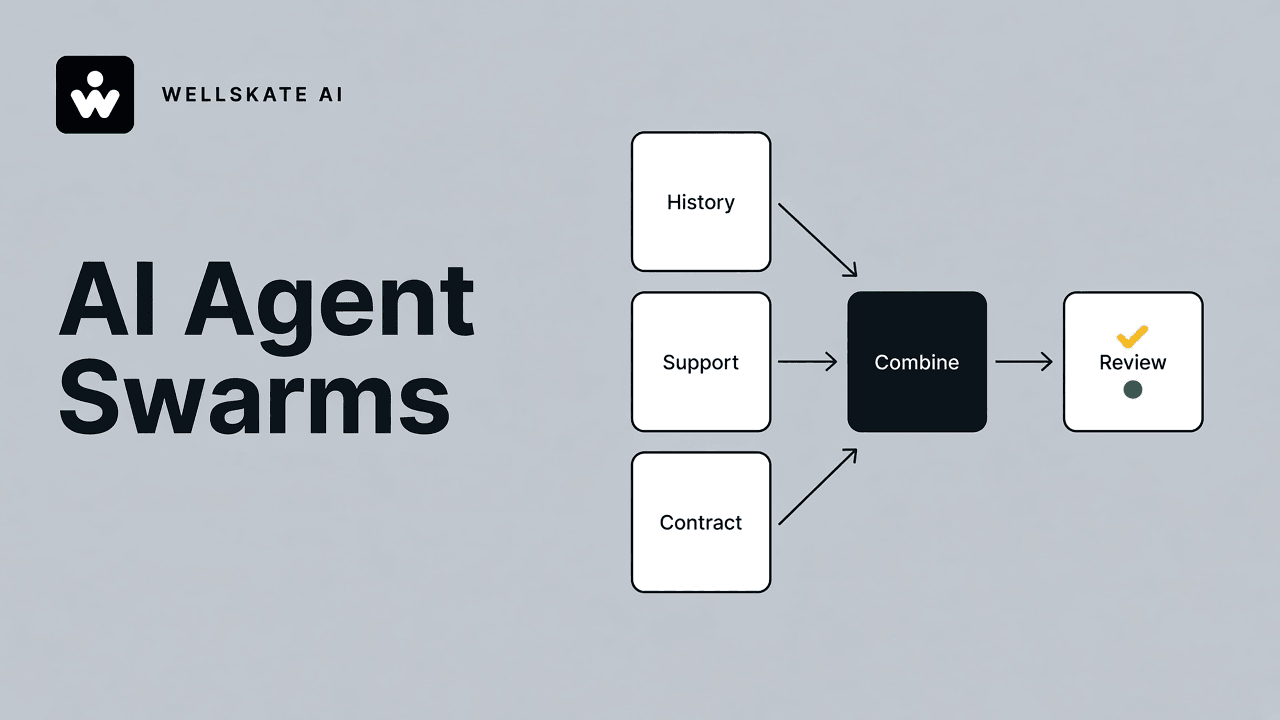
One reviews the customer history. Another checks support records. A third reads the contract. A coordinating agent brings their findings together for you to review.
An AI agent swarm is several AI agents working toward one shared goal. The work is divided into smaller assignments, and the agents pass findings along until a person reviews the result.
Vendors use the word in different ways. In this article it means that working arrangement, not a particular product.
An AI agent swarm is several AI agents dividing one job and sharing what they find, with a person still responsible for the result.
Short answer
- An AI agent swarm is several AI agents dividing one shared job and passing findings along for a person to review.
- Use more than one agent when the work splits into distinct checks. A single summary does not need a swarm.
- The agents prepare. A named person approves anything that binds the company, and important claims should be checked against the original source.
Handing work to a team of agents raises questions a single chat does not. What happens when one of them is wrong? Who can see confidential records? Who decides when the system may act?
First, what is an AI agent?
An AI agent is software that uses AI to work toward an assigned goal. Depending on its design and permissions, it can choose steps, retrieve information, use connected tools, and take actions. A chat reply is only one of the things it might produce.
You might ask a basic chat assistant what a meeting briefing should include. You could instead ask an appropriately connected agent to find the relevant records and prepare a draft briefing.
Appropriately connected is the phrase that matters. An agent does not arrive with access to your company’s files, or with permission to change them. Access and actions have to be set on purpose.
A single agent that plans and uses tools is already a different kind of software from a chatbot that only answers. The shorter version of that distinction is Agentic Workflow vs chatbot. A swarm is a further step: more than one agent, on the same job.
What makes it a swarm?
An agent swarm brings several AI agents together to complete a shared task. The work is divided into smaller assignments. Agents pass findings along the way.
Imagine a team preparing a supplier comparison. One agent examines prices. Another reviews delivery schedules. A third checks support terms. Their findings are brought together into a comparison an employee can review. If an important detail is missing, that piece can go back for another check.
The number of agents is not what makes this a swarm. Their work has to connect. Each agent contributes to the same goal. Three unrelated answers in three windows are three chats.
The goal is a workflow the business can understand, evaluate, and control. It is not the largest number of agents.
A simple example: preparing a customer briefing
Here is one way to design the meeting workflow.
- A person names the account and the purpose of the meeting.
- A history agent reads prior conversations for that account.
- A support agent checks unresolved issues for that account.
- A contract agent reads the agreement that applies to this meeting.
- A coordinating agent assembles one briefing. Each important claim points back to the record it came from.
- A person reviews the briefing before the meeting.
Preparing a recommendation and being authorized to act on it are different permissions. OWASP’s Top 10 for Agentic Applications advises organizations to limit how much autonomy an agent has, and to require a person’s approval for high-impact actions.
Human in the loop is the design of that stop: a named person on the step that binds the company.
Where could enterprises use agent swarms?
Sales: better meeting preparation
A sales workflow could divide account research, customer-history review, and briefing preparation between agents.
The intended result is a useful starting point for the salesperson. Judgment about the customer relationship stays with that person.
Customer support: preparing a response
One agent could identify the type of issue. Another could search approved support material. A third could draft a response.
Design the workflow so uncertain cases go to a support employee. Refunds and account changes need their own approval rules. A draft that sounds sure is still a draft.
Procurement: comparing supplier proposals
A procurement workflow could assign agents to extract prices, compare delivery terms, and flag missing information.
One proposal might look cheaper because it excludes installation. The intended output is a comparison the buyer can verify. It is a prepared pack, and the purchase decision stays with the buyer.
Operations: coordinating an internal request
Consider an employee onboarding request. An agent team could check which information is missing, prepare a checklist, and draft requests for the relevant departments.
Creating accounts or granting access stays inside the company’s existing authorization process.
Marketing: moving from brief to draft
A content workflow could divide research, drafting, and editorial review between agents. A human editor checks the claims and approves publication.
Across these examples, the proposed benefit is less manual gathering and less coordination, with people still responsible for important decisions. Whether that benefit shows up should be tested on one job, then measured.
Does every task need several agents?
More agents do not automatically produce a better result. A 2025 study of popular multi-agent frameworks grouped failures into three kinds: the task was poorly specified, the agents were misaligned with each other, or the result was checked badly, including work that stopped too early or a check that only looked at the surface. (Cemri et al., “Why Do Multi-Agent LLM Systems Fail?”)
If the task is “summarize this document,” start by testing a single assistant. A team of agents needs a reason to exist.
A broader task, such as comparing several proposals against different requirements, is a fair candidate for a divided workflow. The evaluation question is:
Does the extra coordination produce enough value to justify the extra complexity?
What are the potential dangers?
1. One mistake can shape the whole result
AI can state false information with confidence. Passing that statement to another agent does not make it true. Multi-agent research records verification failures of exactly this kind: a later step treats an earlier answer as settled.
OWASP describes the enterprise version as a cascading failure. One fault, such as a misread, a bad tool result, or a poisoned input, spreads through the agents that trust it.
Imagine one agent misreading a contract date. Another uses that date in a briefing. A third drafts a reminder from the briefing. The meeting pack looks complete, and the date is still wrong. That is why the briefing workflow asks a person to check important details against the original record.
2. Confidential information can travel farther than the task
An agent with broad access can retrieve sensitive information, or reveal it in an output or a connected tool. A narrow assignment does not, by itself, narrow the permission.
OWASP’s examples include a tool that can read every record when the task needs one object. In the customer-briefing design, ask whether the support agent needs every customer’s records, or only the account in the meeting.
3. Outside content can try to steer an agent
A document, email, or webpage can contain instructions meant to manipulate an agent. This is prompt injection. Material the agent is supposed to read becomes an attempt to control what it does.
OWASP’s agentic guidance says to treat user text, uploaded documents, and retrieved content as untrusted, before that text can change a goal or a tool call.
A supplier document could try to make a reviewing agent ignore the buyer’s evaluation criteria. Treat outside content as input. It is not a source of authority.
4. An agent can act past the role you described
Reading a record and changing it are different permissions. A written instruction is a weak place to keep that difference. The permission and the approval step have to live in the system.
OWASP cites the plain version: a tool that can send or delete mail, attached to an agent that was only asked to summarize. An agent preparing a customer email should not be allowed to send it because the draft looks finished.
5. Work and cost can keep growing
Agents can call tools again, hand work back and forth, and run until someone notices the bill. OWASP’s mitigations for tool misuse include usage ceilings, such as cost, rate, or token budgets, that throttle or stop the run when a limit is crossed.
For a pilot, decide in advance how long a task may run, how much it may spend, and when it must stop and ask for help.
6. Agents can misunderstand the handoff
The same multi-agent research documents failures where the pieces look reasonable and the job is still wrong. One agent assumes another agent already checked something. Nobody did.
In the procurement example, the comparison agent might assume that another agent checked whether prices include tax. Write that check into a named assignment. “Someone in the swarm will catch it” is not an assignment.
7. A polished answer can create false confidence
Fluent prose and convincing-looking citations can make an incorrect answer feel finished. NIST’s Generative AI Profile calls this confabulation: confidently stated false content, including logic or citations that only appear to support the answer. People believe it because it sounds sure. (NIST AI 600-1)
OWASP separately warns that polished explanations can lead a person to approve a harmful action. “Reviewed by several agents” is not evidence. The useful question is whether an important claim can be checked against the original source.
A practical checklist before a pilot
For a first pilot, choose a narrow task you can undo, such as preparing an internal draft, and answer these questions:
- Purpose: What specific problem are we trying to solve?
- Access: What information does each agent actually need?
- Authority: Which actions require a person’s approval?
- Evidence: Can reviewers check important claims against original sources?
- Limits: When must the system stop?
- Ownership: Which person or team is responsible for the workflow?
- Results: Are we measuring errors and review time, as well as speed?
The access, approval, and limit questions follow established agent-security guidance. They are a starting point. They are not a guarantee of safety.
The bottom line
Think of an agent swarm as a way to divide and coordinate work. It is a design you can inspect. It is not a team that has earned unlimited trust.
Start with a real business problem. Decide what the agents may do, what they must leave alone, and where a person remains responsible. Then test whether the arrangement actually improves the work.
WellSkate AI is built so teams can create custom AI agents on work they already run, without a separate engineering project for every workflow. A swarm is one design to test on a single job. Add agents when that job shows the extra coordination is worth the extra complexity.
Want to try this on one workflow your team still gathers by hand? Explore WellSkate AI at wellskate.ai, and bring that job with you. You can also write to contact@wellskate.ai.
Frequently asked questions
What is an AI agent swarm?
In this article, an AI agent swarm is several AI agents working toward one shared goal. The work is divided into smaller assignments, and the agents pass findings along until a person can review the result. The number of agents matters less than whether their work actually connects.
How is a swarm different from one agent?
One agent can already plan, retrieve records, and use tools, within the access you grant. A swarm splits one job across several agents, for example history, support, and the contract. A coordinating step then brings those findings into one pack. If the task is a single summary, start with one assistant.
What should a person still decide?
Anything that binds the company or is hard to undo: sending a customer commitment, issuing a refund, granting access, approving a purchase, or publishing a claim. The agents in these examples prepare. A named person decides. OWASP recommends human approval for high-impact actions, and that approval has to be enforced in permissions, not only in a written instruction.
What should a first pilot measure?
Errors, review time, and whether important claims can be checked against the original source, along with speed and cost. Also set a stop: how long the task may run, how much it may spend, and when it must ask for help. A finished-looking briefing is not the result if a person still has to redo the gathering.