
How WellSkate AI Flagged a Potential Phishing Email: A Detection Case Study
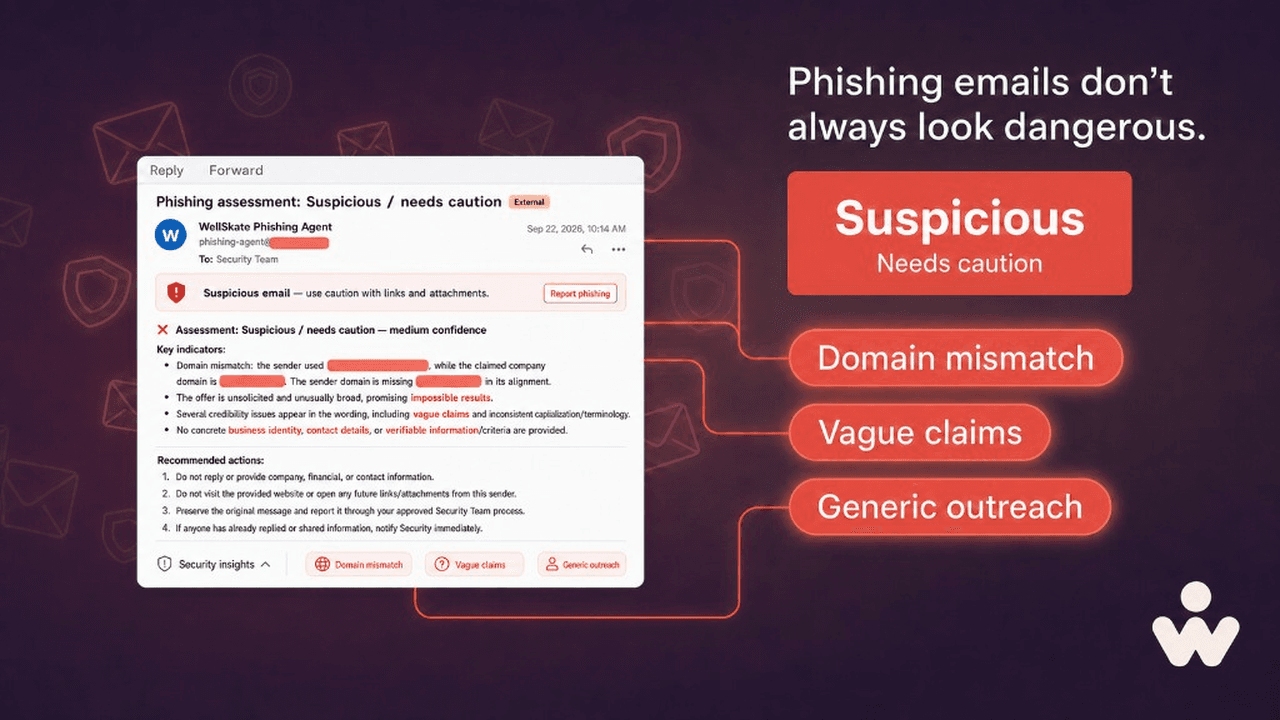
Not every suspicious email is an obvious credential-theft message or urgent payment request. Some are written to appear credible, begin a conversation, or encourage recipients to disclose information before the sender has been verified.
In a recent case, the WellSkate Phishing Agent reviewed an email that raised concerns because of inconsistencies in the sender identity, vague claims, and limited verifiable context.
Rather than accepting or rejecting the message based on instinct, we used a structured phishing detection review. The result: Suspicious / needs caution, with medium confidence.
This article explains the warning signs the agent identified, why they matter, and how teams can respond safely to a potential phishing email.
Important note: This case study is a risk-based assessment of observable indicators. It does not make a legal finding that the message is phishing.
Why potential phishing emails require careful review
Phishing messages do not always contain malicious links, attachments, or obvious threats. Some attempts are designed to establish trust first. The sender may use a plausible identity, refer to a legitimate-looking organization, or make a broad request intended to start an exchange.
The first message may appear harmless. Its purpose may simply be to identify who is willing to respond or share information. Later communications can request confidential documents, account details, identity documents, payment information, access to senior decision-makers, or action on a phishing request.
That is why a questionable email should be treated as a security event until the sender and request can be independently verified.
How WellSkate AI detected warning signs in the email
The WellSkate Phishing Agent evaluated the message for inconsistencies, credibility gaps, and social-engineering signals. Several indicators contributed to the assessment.
1. Sender domain did not match the claimed organization
The strongest red flag was a mismatch between the sender’s email domain and the domain associated with the organization named in the message.
The two domains appeared very similar, but one contained a spelling variation. This type of lookalike-domain pattern is important because it can be easy to overlook in a busy inbox. Attackers and impersonators often rely on small changes — such as omitted letters, swapped characters, or altered top-level domains — to make an address appear legitimate at a glance.
A domain mismatch does not automatically prove malicious intent. An organization may use alternate domains, or an employee may make a genuine typing mistake. The inconsistency still warrants independent verification before responding, clicking anything, or sharing information.
2. Vague claims with very limited detail
The email used broad language intended to prompt further engagement, but it offered little specific, verifiable context about the sender, the organization, or the reason for contact.
A legitimate message normally provides enough information to validate the interaction, such as:
- The organization’s legal or trading name
- The sender’s role and direct contact details
- A clear description of the purpose of the message
- Specific context for why the recipient was contacted
- A verifiable website, public profile, or established point of contact
- Clear next steps that do not require immediate disclosure of sensitive information
In this case, the message paired broad claims with minimal evidence of a specific purpose or existing relationship. WellSkate AI treated this combination as a reason for caution.
3. Generic and unexpected outreach
The message did not explain why the recipient had been selected, reference a known relationship, or provide details that demonstrated familiarity with the recipient.
Generic outreach is not necessarily malicious. Legitimate contacts can send brief or unexpected messages. Generic wording is also common in campaigns designed to reach many recipients and identify people who may be willing to engage.
WellSkate AI considered the unexpected and nonspecific nature of the message a supporting risk factor — not proof of phishing by itself.
4. Writing and presentation issues
The agent also noted credibility issues in the message, including a misspelling in the subject line and inconsistent wording.
Writing errors alone are not a reliable phishing test. Legitimate people make mistakes, and some phishing attempts are professionally written. When errors appear alongside a confusing sender identity, vague claims, and a lack of verifiable detail, they add useful context to the overall risk assessment.
Phishing detection should not overreact to a single clue. It should evaluate the overall pattern.
What WellSkate AI recommended
Based on the combined indicators, WellSkate AI recommended a proportionate response:
- Do not reply from the original email thread. A reply can confirm that the mailbox is active and may encourage further social engineering.
- Do not click links or open unexpected attachments. Do not use a link in the email to verify the sender.
- Preserve the original email. Keep the sender address, timestamps, message headers, and any attachments available for review.
- Report the message to the security team. Security teams can investigate technical indicators and determine whether other employees received similar messages.
- Verify independently. If the message appears relevant, find official contact details through a trusted independent source — not through the original message — and verify the organization and sender before engaging.
- Document the decision. Record whether the message was blocked, escalated, or independently verified to support future security reviews.
What not to share before verifying a sender
Before an unfamiliar sender has been independently verified, avoid sharing:
- Passwords, multi-factor authentication codes, or account-recovery details
- Financial information or bank account details
- Identity documents or beneficial ownership records
- Confidential documents or files containing metadata
- Customer, supplier, or internal contact information
- Executive calendars, meeting links, or internal contact lists
- Login credentials, API keys, or access tokens
Even limited information can help an attacker create a more convincing follow-up message.
The assessment in the inbox
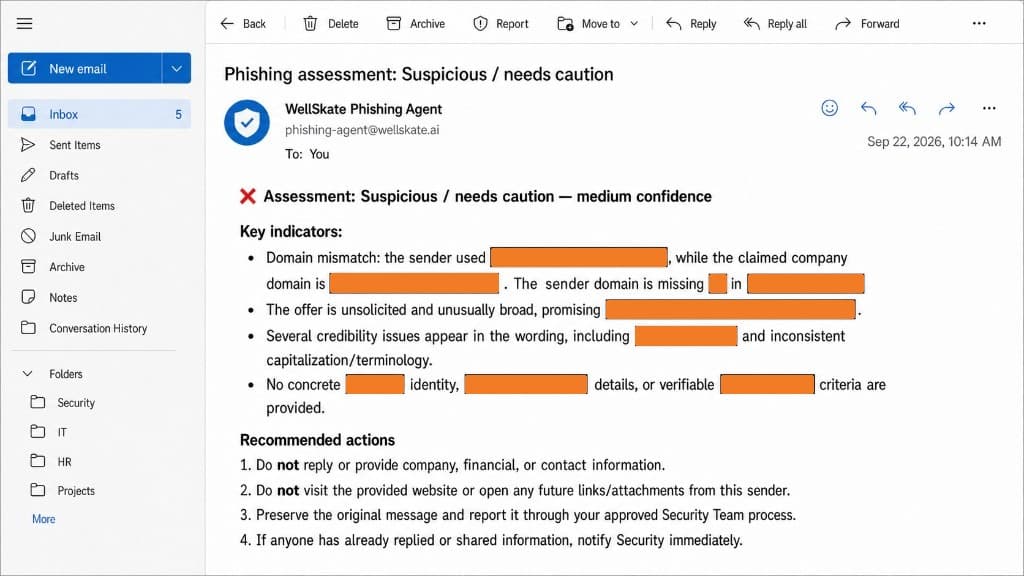
The WellSkate Phishing Agent returned the review as an email, so the recipient could see the result without opening the original message. The result is Suspicious / needs caution, with medium confidence.
The note calls out a domain mismatch, an unsolicited and unusually broad offer, credibility issues in the wording, and the lack of a concrete identity or verifiable details. It then recommends not replying, not visiting the sender’s site or opening later links and attachments, preserving the message for the security team, and notifying security if someone has already engaged.
Domain names and other identifying details are masked so this article does not point readers at a suspicious destination.
Key takeaway: verify before you engage
A professional-looking email does not establish legitimacy. Before responding, clicking, downloading, or sharing information, verify the sender and the request through trusted, independent channels.
In this case, the WellSkate Phishing Agent helped turn a vague concern into an explainable decision. It highlighted the sender-domain inconsistency, placed the message’s claims in context, identified the generic outreach pattern, and recommended clear next steps.
That is the purpose of effective phishing detection: helping teams pause at the right moment, protect sensitive information, and verify communications through trusted channels.
Frequently asked questions
How can I tell whether an email is phishing?
Look for a verifiable sender identity, a domain that matches the claimed organization, a clear purpose, specific context, and a request that can be confirmed independently. Be especially cautious if the email pressures you to act, click, download, disclose information, or bypass normal processes.
Is a domain mismatch always a phishing scam?
A domain mismatch can result from an alternate corporate domain, a typo, or a configuration issue. It is still a meaningful warning sign and should be verified independently before you engage.
What should I do after receiving a potential phishing email?
Do not click links, open unexpected attachments, or provide sensitive information. Preserve the message, report it to your security team, and verify the sender through independently sourced official contact details if a response may be necessary.
Why can generic emails be risky?
Generic messages can be used to identify recipients who are likely to respond or share information. They may also be the first stage of a longer social-engineering or impersonation attempt.
Want to review a suspicious email before anyone replies, clicks, or shares information? Explore WellSkate AI at wellskate.ai or contact contact@wellskate.ai.